
Sample index report
See what a BoastIndex index status report looks like
This sample index status report shows indexed vs not indexed URLs, what changed since the last inspection, index health, and the indexing journey funnel. Download the PDF to share with your team or a client.
Run this on your URLs. First report free for new accounts. A one-time credit is applied at checkout.
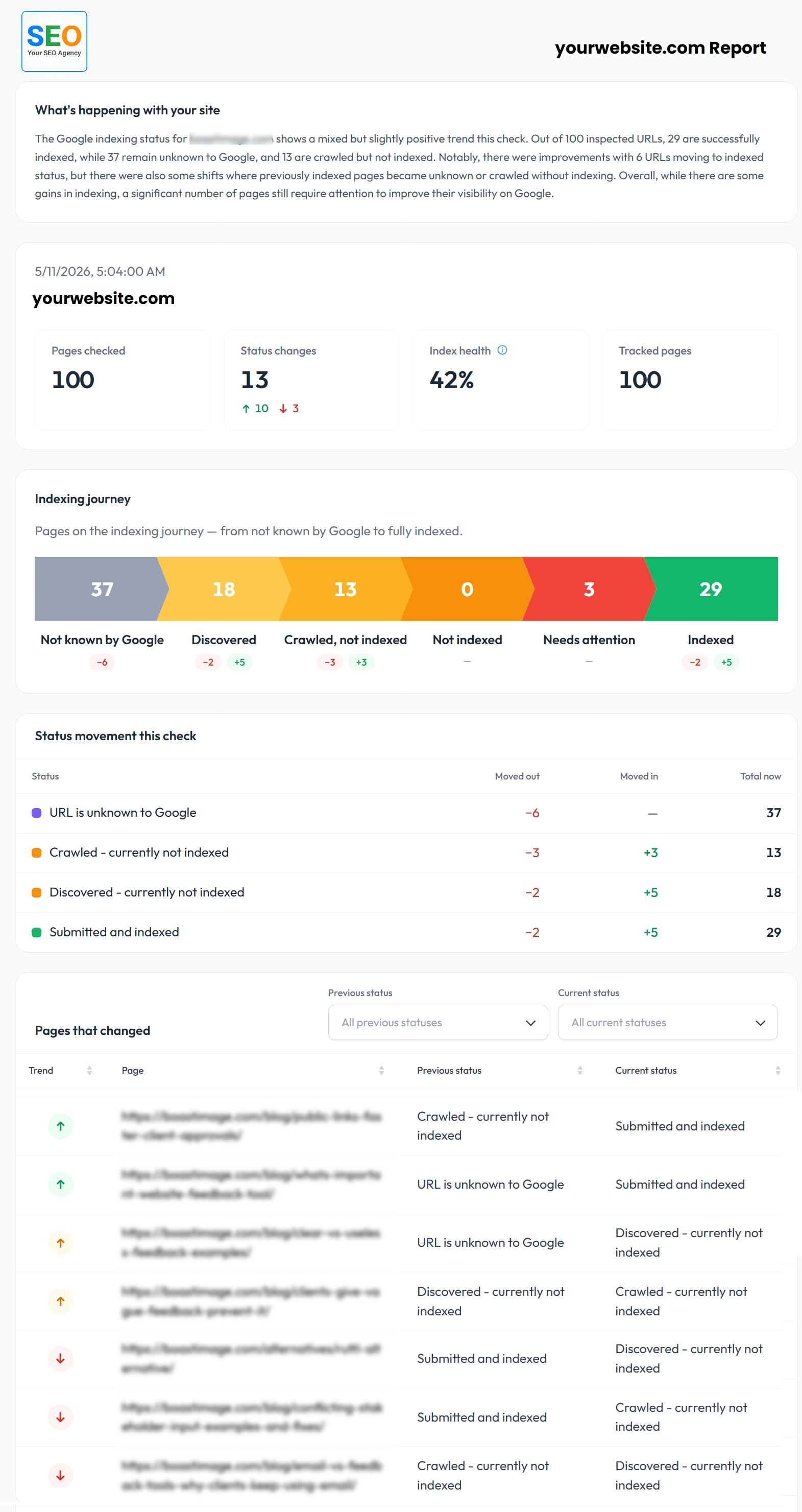
Partial Preview
The full report continues below this cut. Download the PDF to see every section.
What the sample report includes
BoastIndex builds each index status report after a completed review. You do not rebuild it from Google Search Console exports.
Site summary
Pages checked, status changes, index health score, and a short plain-English overview.
Indexing journey funnel
Shows how URLs move from not known by Google to discovered, crawled, and indexed, including change indicators.
Status movement
Which URLs moved in or out of each status since the last inspection.
Changed URLs
Pages that improved, declined, or moved laterally. Each row shows previous and current status.
Your branding on the PDF
Add your company name and logo before you send the report to a client or stakeholder.
Export options
PDF for delivery, CSV for spreadsheets, and JSON for other tools.
Year-round index status reports
Get this report after every review
Yearly monitoring keeps BoastIndex inspecting your URLs on schedule. After each review you get a fresh index status report with change history, index health trends, and alerts when important pages move.
- Reports generate after every completed inspection batch
- Index health trends and changed-URL history over time
- Alerts when important URLs move in or out of the index
- Starts at $150/year for 100 pages on a weekly cadence
Or get a one-time index report. First report free for new accounts, then from $15. No subscription required.
How to read the report
- Indexed: Google reports the URL is in the index.
- Not indexed: Google inspected the URL but it is not indexed.
- Changed: Status moved since the previous inspection.
- Needs review: Worth investigating before the next review.
FAQ
Sample report FAQ
What is included in a BoastIndex sample report?
The sample report shows a complete index status deliverable: site summary with pages checked, status changes, and index health score; an indexing journey funnel; status movement table; changed URLs with previous and current status; and co-branded PDF formatting suitable for client delivery.
How should I read an index status report?
Start with the site summary for the big picture, then review the indexing journey funnel to see where pages sit in Google's pipeline. Check status movement for URLs that shifted, and use the changed URLs table to prioritize follow-ups. Stable pages are listed separately so you can see what did not change.
What does the changed URLs section show?
The changed URLs section lists every page whose index status moved since the last inspection: improved, declined, or lateral changes. Each row shows previous status, current status, and a trend indicator.
What does needs review mean in an index status report?
Needs review flags URLs with a status that warrants investigation before the next scheduled review, such as pages stuck in crawled-not-indexed or discovered states, or URLs with conflicting signals. It helps teams prioritize follow-up work.
Can I generate a report for my own URLs?
Yes. Subscribe to yearly monitoring for scheduled inspections and automatic reports after every review, with history, alerts, and trend tracking. Or get a one-time index report. First report free for new accounts (covers the $15 report for up to 100 URLs); after that, reports start at $15. No subscription required for a one-time report.
Does a report explain exactly why every URL is not indexed?
Reports show the index status Google reports for each URL and what changed over time. They do not guarantee a single root cause for every not-indexed page. The status labels, change history, and funnel view still help you decide which URLs need technical review.
Start year-round index status reports
Connect Google Search Console, set your inspection schedule, and get an index status report after every review.