
Google URL inspection tool
A Google URL Inspection Tool Built for Monitoring, Not Guesswork
Inspect Google index status for your important URLs on a recurring schedule, not one manual check at a time. BoastIndex stores what Search Console reports over time so you can see changes, not only a single snapshot.
| URL | Frequency | Last inspected | Current status |
|---|---|---|---|
| /pricing/ | Weekly | Jul 7 | Not indexed |
| /product/category-pages/ | Daily | Jul 8 | Indexed |
| /resources/crawled-currently-not-indexed/ | Monthly | Jul 1 | Crawled, not indexed |
Stop checking URLs one by one in Search Console
Google's URL Inspection tool works for spot checks. It does not scale when you need bulk URL inspection, recurring schedules, or a url inspection report your team can share.
| Manual GSC inspection | BoastIndex scheduled monitoring | |
|---|---|---|
| Scale | One URL at a time | Import a sitemap, CSV, or list and monitor hundreds or thousands of URLs |
| Frequency | Manual, whenever someone remembers | Daily, weekly, or monthly on autopilot |
| History | No record of past checks | Full status history per URL |
| Alerts | None | Notified when important URLs change status |
| Reports | Copy-paste from GSC | Automatic index status reports after each run |
Frustrated by GSC showing one thing and Google showing another? Read about Search Console indexing mismatches.
Connect Search Console and start inspecting
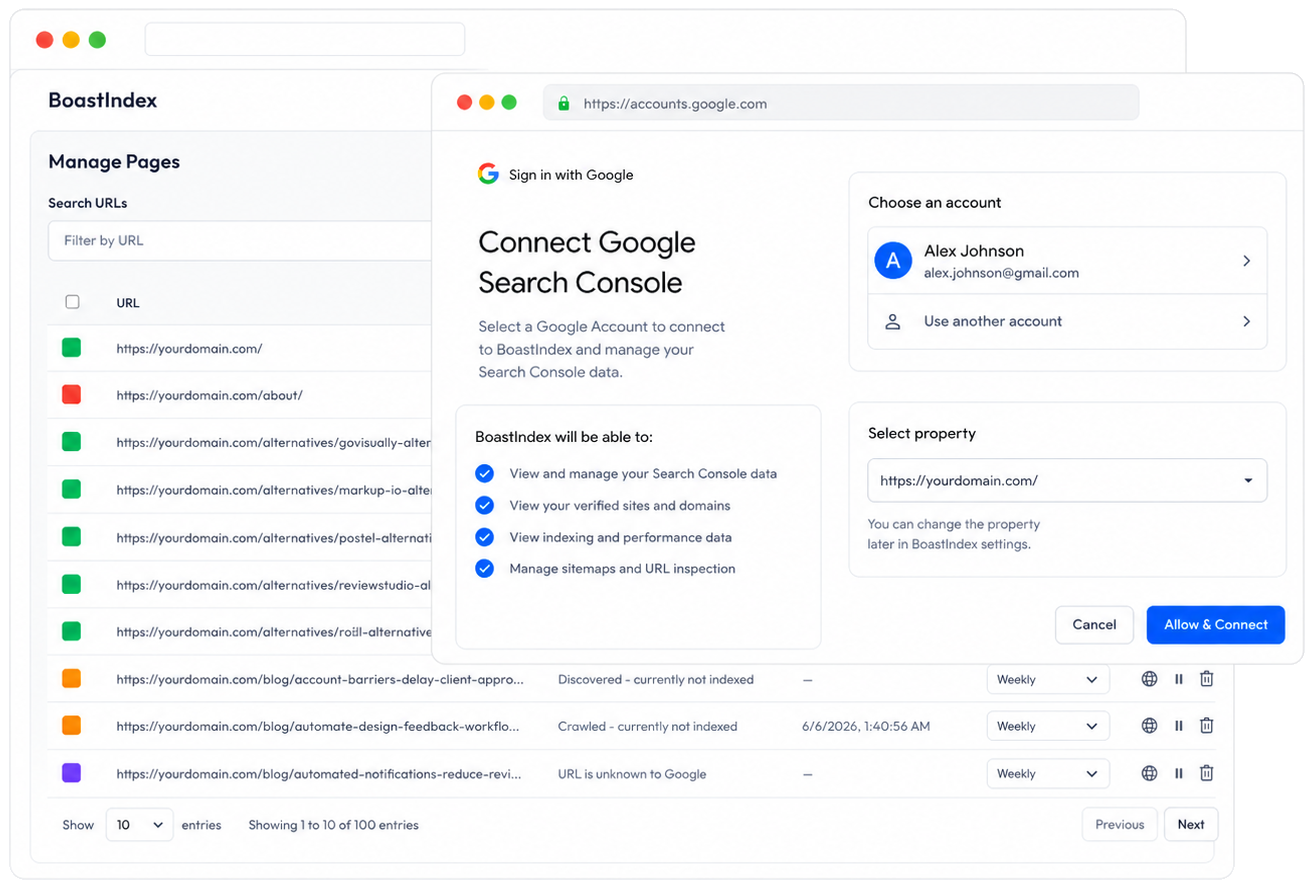
BoastIndex uses read-only Google Search Console access and the URL Inspection API. It does not modify your site or GSC settings.
Live in about five minutes
- 1Connect Google Search Console (read-only OAuth).
- 2Choose a property and import pages from sitemap, CSV, or list.
- 3Pick inspection frequency per URL: daily, weekly, or monthly.
- 4Set a site-wide default frequency if you want one.
- 5First inspections run automatically.
Daily, weekly, or monthly bulk URL inspection
Set a site default or override per URL. Inspection frequency affects monthly volume. Use the calculator on plans & pricing to model high-volume bulk URL inspection.
Daily
Money pages, launches, and anything you cannot afford to miss
Weekly
Default cadence for most tracked URLs
Monthly
Stable content and large catalogs
What you get after setup
Scheduled inspections are the base. Monitoring, alerts, and reports each have their own product page if you want the details.
- Status labels and index health a plain-English view of every inspected URL. Google index monitoring →
- Alerts when status changes catch de-indexing and noindex accidents early. Alerts & monitoring →
- Automatic index status reports shareable output after every completed run. Index status reports →

URL inspection statuses BoastIndex tracks
These are the Search Console statuses teams usually chase with reports and one-off checks.
Crawled — currently not indexed
Google crawled the URL but has not added it to the index.
Discovered — currently not indexed
Google knows about the URL but has not crawled or indexed it yet.
Alternate page with proper canonical tag
Google is indexing a different canonical version of the URL.
Duplicate, Google chose different canonical than user
You declared one canonical, but Google indexed another URL.
Excluded by noindex tag
The page is intentionally or accidentally blocked from indexing.
High-volume URL inspection
Large page sets and daily inspection schedules increase URL Inspection API usage. BoastIndex pricing scales with tracked URLs and frequency. Model volume on plans & pricing.
See what a completed inspection run produces
Every batch generates an index status report. Preview the full deliverable on the sample report page: indexed vs not indexed, which URLs changed, and which pages need review.
View Sample Index Report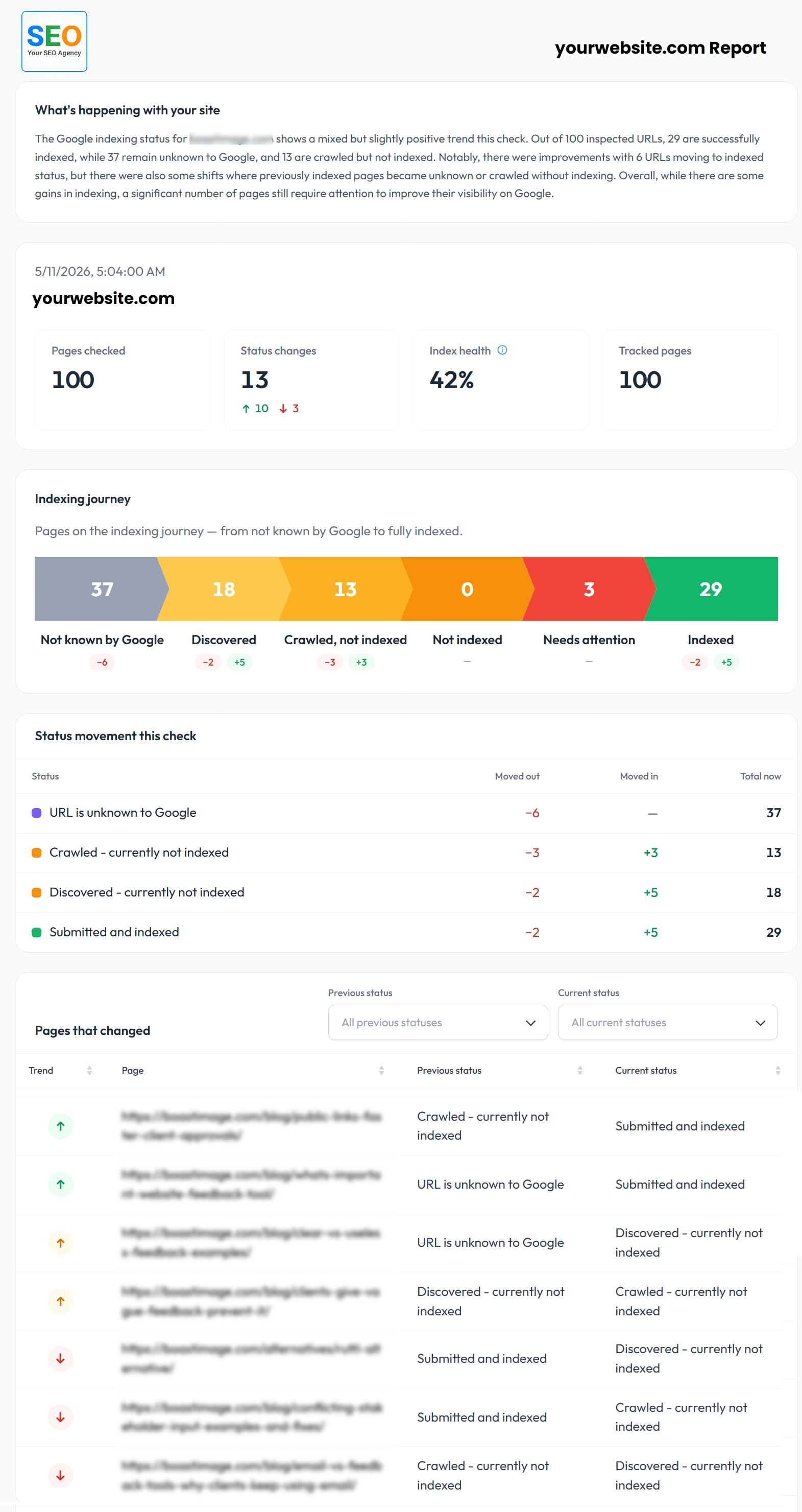
Related product pages
Chrome extension
See Google index status on the page you are viewing
If you already monitor URLs in BoastIndex, the Chrome extension shows indexed, not indexed, discovered, or crawled for the current tab. One click from the toolbar.
Requires a BoastIndex account with monitored URLs.
FAQ
Google URL inspection FAQ
What is a Google URL inspection tool?
A Google URL inspection tool checks what Google Search Console reports about a URL's index status: indexed, not indexed, crawled but not indexed, canonicalized, or blocked. BoastIndex runs those inspections on a schedule across many URLs instead of checking them one by one in GSC.
How is BoastIndex different from checking URLs manually in Google Search Console?
Google Search Console is built for spot checks on individual URLs. BoastIndex imports your important URLs, runs scheduled URL inspections automatically, stores status history, sends alerts when statuses change, and generates index status reports. That lets you monitor at scale without opening GSC repeatedly.
Can BoastIndex inspect many URLs on a recurring schedule?
Yes. You can import URLs from a sitemap, CSV, pasted list, or manual entry, then choose daily, weekly, or monthly inspection frequency per URL or as a site default. BoastIndex runs inspections automatically on that schedule.
What URL inspection statuses can BoastIndex track?
BoastIndex tracks the indexing statuses Google reports through URL Inspection, including indexed, not indexed, crawled — currently not indexed, discovered — currently not indexed, alternate page with proper canonical tag, excluded by noindex tag, and other coverage states. Status changes are recorded over time.
Can I import URLs from a sitemap or CSV?
Yes. After connecting Google Search Console with read-only access, you can import URLs from your sitemap, upload a CSV, paste a list, or add URLs manually. You choose which pages to monitor and how often each should be inspected.
How often should I inspect important URLs?
It depends on how critical the URLs are and how fast your site changes. High-priority pages such as money pages, new launches, or client deliverables may warrant weekly or daily checks. Stable content may only need monthly inspections. BoastIndex supports all three cadences.
Does BoastIndex request indexing for inspected URLs?
No. BoastIndex does not request indexing, submit pages to Google, or try to force Google to crawl a URL. It monitors what Google reports, tracks index status changes over time, and helps identify URLs that need review.
Can URL inspection data be exported into reports?
Yes. Each completed inspection run produces an index status report showing current statuses, changed URLs, and summary stats. Reports can be exported as PDF, CSV, or JSON for your team or clients.
Start inspecting URLs on a schedule
Connect Search Console, import the URLs that matter, and run Google URL inspections on your schedule.